Wednesday, 15 September 2021

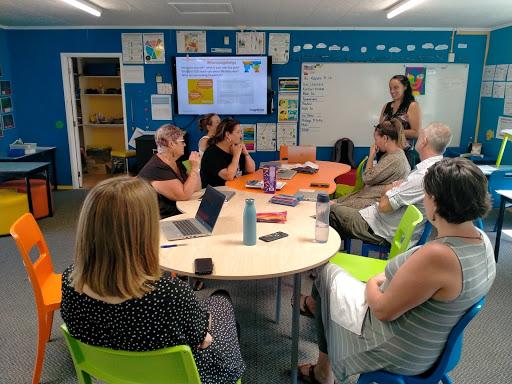
PACT Hui with Susan Arrowsmith 14.09.2021

 We explored how to make teacher judgements today using the PaCT tool. Reviewing what we have already covered reminded us that we need to remember to look at what we are taking away from each lesson.

Take aways:

  1. It is important to view the illustrations provided to get a really good idea of what the big ideas really mean for each set/ signpost.

  2. If you think a student(s) is displaying evidence at one signpost then read the descriptions above and below to double check the level of sophistication fits.

  3. The illustrations are also really great ideas for teaching a big idea.

  4. You don’t need to review each student for each set. You would group students to think about where they are to decide your deliberate acts of teaching for the next steps, one aspect at a time.

  5. We will rotate our specific focus each term on reading this year as we familiarise ourselves with these learning progressions. It would be impossible to be thinking about all the aspects for R, W and M constantly!

  6. As always we would use OTJ from a number of evidence sources to decide where students are.

  7. The focus should be less about where students are in terms of giving them a ‘level’ and more about What do I need to teach, and them to learn next”


We took a sample of students work and then looked at each aspect and used the blurb and the illustrations to help us place a student on a sign post. 


A good discussion happened at the end of the hui regarding E-asttle v's PACT tool for end of year assessments. Below are some of the things we took away from this lesson. 

We have noticed ...

...with practice I will get faster at this and more confident with making judgements

…need to change year levels of some students, classes have been set up with names to use now, look at notifications

… writing LPF is good to use. Want to use instead of asstle this year as doubling up. Maybe can for yr1-2??

...would be really valuable to go to experts on staff to moderate with my tricky judgements

PaCT tool - taken lots away. Talking with others about what our kids are doing at different levels, useful to collaborate

Feel confident with it and I want to finish putting them in

… just get it in! You know more than you think you do with your first sense.  Calm the farm a bit - you can’t teach it all

… after so long thinking about it, procrastinating and not doing it. Getting stuff in has been beneficial. SO many opportunities to double check and triple check, so it’s robust and thorough. 

Wednesday, 10 February 2021

Graduate Profile PD 11.02.2021

 Cognition Education 

Planning  

Rob, Kaiya, Diane, Cindy, Sarah, Kara, Meg, Mark,

Introductions and reflecting on how 2020 was for us and our students and what we see going forward.

Why are we designing a graduate Profile?

  • Streamline what we do well

  • Internal Review

  • Transition 

  • Improve local curriculum

  • Integrate PD

  • Best Students 

Underpin our graduate profile using coherent pathways with beacons that highlight the progress in our school.

Provides a clear pathway for students whanau and community.

School vision, values are the main driving force for our Graduate Profile.

Graduate Profile

What does this look like at different levels and then create a rubric to provide goals and give something for them to aim for.

Inspire (more about personal and interpersonal skills ie how do kids inspire each other.

Create literacy etc expectations were not specific across the curriculum. 

"IDEAS ARE NOTHING UNLESS THEY ARE PUT INTO ACTION IN MEANINGFUL WAYS"

Spring boarding off our graduate profile for our content for 2021.

How can I plan for opportunities to teach the GP?

A good starting place would be using the whare tapa wha model (NZC - expectations, GP- Inspire, Student Wellbeing)

We did a collaborative planning project that looked at a planning scenario

Junior (put your own reflection here)

Explore terms friendships, relationships, feelings tuakana-teina develop projects inside the school and maybe include whanau.

Middle (put your own reflection here)

Look at different games and how they promote friendships, relationships, feelings tuakana-teina. Develop projects that and games that include whanau and community resources.

Senior (put your own reflection here)

Project to organise events at school that promote friendships, relationships, feelings tuakana-teina.. Collect data survey community pilot projects and creating

UDL Katie Novak is a good resource for curriculum design.


Friday, 8 May 2020

DFI 9


I did not feel confident enough to do the exam today. A bit of a chicken! I have learnt so much throughout the DFI but find that I do take a little bit longer to consolidate some of the new learning. It is great to have the rewindable learning so that I can continue to go back and practise things I am unsure of. Thank You to our wonderful facilitators who have been so patient and helpful. 
I am really enjoying using what I have learnt with my staff through google meets and also with the class I teach through a site. I am also working on a site displaying our school curriculum.
This learning has been so timely with online learning due to Covid-19. I feel really fortunate to be part of Manaiakalani.

Ubiquitous - Anytime, Anywhere, Any pace
Rewindable learning- This has been so useful for me, knowing I can go back and look at things and learn at my own pace.
Online learning during Covid-19 has made ubiquitous learning a reality, our students are learning at home and can rewind and can learn anytime, anywhere.
Summer Learning Journal has made a huge difference to students who participated in this.
Technology enables removal of barriers, previously inconceivable solutions to problems, opportunities for new ways of learning. IT'S NOT JUST A TOOL.

What I am proud of - I have learnt so much and I am able to use so many more digital skills. I am proud of the fact that I can 'troubleshoot' problems and find solutions.

What I regret - Not being brave enough to sit the exam.

What I will be taking forward to the new era of schooling - Using these things when we are back at school, don't go back to what we were doing before, incorporate both styles of teaching.

DFI 8


I enjoyed todays session. I can totally see how people get 'hooked' on coding, this was really fun. I will need to go back and look at how I enter commands as I did have my sprite going around in circles and banging his head quite often! I can see how this is something the students will really enjoy. The learning about the Digital Technology Curriculum was great. This is something I have noted to go over with staff when we are back at school. There are parts we are already doing well, but using some of the tools to see where we really are and what our next steps are will be very valuable.
Other things I took from this session are:

Empowered Learners and Teachers

Taking back control of their own lives.
Its not just a tool.- transforms the way we learn, new uncharteredexperiences and oportunities.
Assist the making of connections by enabling students to enter and explore new learning environments, overcoming barriers of distance and time.
Nigel Latta - What next.
Agency 'v' empowered. Agency can be a difficult word for some whanau to understand. For some agency is not always positive. Empower people.
32 million less spoken words decile one children compared to decile 10.
1/3 children in decile 1 communities change schools every year.
Teach children to carry on a conversation like table tennis, backwards and forwards.
Opportunity to become discursive through blogging, helps to improve reading and writing.
Kaupapa words - cannot have one without the other. They are empowered because they are connected, ubiquitous and it is visible.

Thefuture of Tech

10 breakthrough technologies of 2020 - Robot dexterity, New wave nuclear power, predicting premature babies, gut probe in a pill, custom cancer vaccines, cow free burger, carbon dioxide catcher, an ECG on your wrist, sanitation without sewers, smooth talking AI assistants.
The activity looking at how driverless cars are programmed was very confronting, challenging your ethics.

The digital technologies curriculum - Computational thinking.

A digitally fluent person can decide when and why to use specific digital technologies to achieve a specific task or solve problems.
A digitally capable person can create their own digital technologies solution.
It is important that students have opportunities to be innovative designers and creators of digitla solutions - moving beyond solely being users and consummers of digital technologies.

Technology strands - Technological practice, Technological knowledge, Nature of technology.

Two new areas - Computational thinking for digital technologies. Designing and developing digitalmutcomes.
Computational thinking - Programming - input, output, sequence, iteration, selection, variables.
Unplugged activities, Algorithms. Understanding human behaviour, Understanding binary, Robotics, Sphero, Arduino, Lego, Makey makey.
Design and developing digital outcomes - DLO digital learning objects, google slides, google drawings, Animation, Stopframe, App development, code org, 3D modelling, environments, Google sketch up, Tinkercard, Movie making, i movie, Movie maker, Game design, scratch, Code, Designing systems.

Progress outcomes/ Elements of programming - Analysis, Design, Coding, Testing, Debugging

Coding
Had a go at Minecraft - How adictive is this! Great fun. I have to admit that my little man did bang his head against the rocks several times while I was practising!


Wednesday, 29 April 2020

DFI 7


I have struggled a bit with the DFI today. I am one of those people Dorothy talked about who really need someone sitting beside them, giving them instructions. I had some understanding of Hapara, so that was fine, but I found the chrome book and i pad activities difficult without the actual device.
I also found it difficult to add my Teaching as Inquiry to my blog. This was abit fast for me. I know that I need totake time and often go over things several time to consolidate new knowledge.


Other learning from DFI 7

Being Cyber Smart - Fiona Grant

Elevate the positive, using positive language.

Why Cybersmart?
Empowering young people to make smart decisions online.
Be internet Awesome, be internet smart, be internet strong, be internet alert, be internet kind, be internet brave.
Whoe school focus, consistent language, collaborative planning. Smart learner, smart footprint, smart relationships.
Being Cybersmart empowers learners to connect when their learning is visible and ubiquitous.
Whenever and wherever we share online its personal.
Blog comments - positive, thoughtful, helpful. Right place right time. What does this look like?
Cyber smart learning is at its best when embedded into an existing educational programme.
Smart learners use their device to power up their learning.

Hapara

Hapara allows you to focus on the teaching not the technology.
Can shift panes in Principal view to target specific students.
Documents might be in 'sharing' if you have not directed students to add to the appropriate folder.
Noticed lots of unfiled work in some classes.
Don't have highlights on when students are at home as this is unethical.

1-1
Decision to go 1-1 was providing equity to everybody, align with treaty.
Providing the verybest device for learning for every young person.

Chrome books
Give new teachers a chrome book to use so they become familiar with how the students are learning.
Found these activities quite difficult without having an actual chrome book to try everything on. Will make a point of taking a chrome book from school and going through the Digital Dig again.

I Pads
Learners at the centre of the experience.
Safety video for i pads, check that we are using this with out students.
Explain everything enables teacher and learner to create and share learning.
Use the names that the tools are given on explain everything for consistency,
Like with the chrome books I will get one of our i pads with explain everything and have another go at the tasks.

Screen Castify
I had a go at recording a screen castify. I need to continue to look at how this could be used for instructions relating to online lessons. I would like to look at examples of screen castify's that others have made to get more ideas on how this could be done then used when I am teaching, especially for providing rewindable lessons for students.


Saturday, 18 April 2020

DFI 6


Has been a busy couple of weeks with learning going online.
Have had lots of staff meeting to discuss what our learning will look like. Class started on Wednesday with high numbers of students online in all classes. Great to see the faces of all the children. They were so excited and engaged. Teachers have adapted so well and are all using their class sites to guide the learning.
The things I have learnt over the last few weeks on DFI have been a huge benefit. I would never have been able to organise google meets, share my screen and run online staff meetings, or support staff with these things if I had not been part of DFI. I know my staff who have also been through the DFI are  hugely grateful that they have the knowledge to put into practise.

Points from todays DFI
Connected

Digital enables us to keep connected.
24,000 learners part of the manaiakalani outreach.
Shared language connects us, we are visible.
The act of sharing creates connection. Multiple layers of opportunities for learners to connect.
Really simple syndication - pulling everything together for blog posts.
Connected, ubiquitous, empowered, visible. Maximum effectiveness is achieved when all four goals are genuinely occuring.
The important thing is living together, making friends and exchanging ideas.

Sites
What makes a good site - visual, colourful, include learning intentions, not too much writing.
Site isn't replacing the teacher.
Affordances causing accelerated shift. Learn create share - engagement, teaching conversations, cognitive challenge, visibility, scaffolding.
Digital - learning is accessible anywhere, visible planning and teaching.
Consistency throughout age groups.
Aim for three clicks from home page to learning.

I know I need to continue working on building sites. I have found this quite difficult with the distance learning. I often need to be shown things several times. The facilitators have been amaing, and very patient, but it's still not quite the same as face to face. 
I was really impressed with the sites of the other teachers in our group. We have such amazing strengths in our local communities, I know I have within my school as well, and I will use these people to help support my further development in this area.
Link to one site I have created for my teaching day in year 7/8 class.
https://sites.google.com/view/anzac-2020/home?authuser=1

Sunday, 5 April 2020

DFI 5 Sites


Learning about sites today. I made a site, but after looking at what others have done I realise that my site would not be engaging or motivating to students. I will go back and continue to work on my site. I think I have enough knowledge of how it works to continue 'playing' and adding things to make my site more appealing. I will continue to look at what others have done and use rewindable learning to access the slides showing us how to create a slide. Learning in this way online is giving me an insight into what the learning is going to be like for our students in the coming weeks. Sometimes it can be difficult to fully understand something when you don't have someone sitting alongside you. I need to be thinking about how we are going to make this happen for our students.

Other things that I got out of todays session.

Gratitude link-So nice to hear of everything that people are grateful for in these challenging times.

Visible Teaching and Learning

Either you can see it or you can't, clear crisp vision. Make what you are doing visible. Limit the links, take away the barriers. Links to everything on class sites, ready to go for all students.
Visibility includes whanau. Whanau in the home can participate in childs learning. Visible to colleagues, making practise visible to learn from each other.
Previously learning has often been hidden from learners and their whanau, not open process contributed to failure at times. Rewindable content means learners can go back and look again.
Success was often being able to read the teachers mind, what did they want.
Cultural capital, parents can help their children how to be successful at school, not the same for all students. Learning intentions and success criteria has helped to make the learning more visible.
Whole journey - planning, process, outcomes, assessment.
Child at the centre of the learning.
Day to day functioning and progression should be open and visible.
Google sites - space to design online website to turbo charge learning.
No surprises - think about this when looking at teachng and learning, think ahead and remove barriers.
Hapara teacher dashboard, designed for manaiakalani so that learning is visible to the teacher. One slide deck to give teachers visibility. Parent portal makes learning visible to parents.
Class on air, episodes still available on class on air, modelling teaching from home.
Inquiries visible online, may be through blogs. share what works and also what doesn't.
Feedback and feed forward crucial to learners. Through technology we can leave comments and get threaded conversations going with children, also through their blogs, keep connecting with their learning.
The most effective teachers use the Learn, Create, Share pedagogy.
Technology can make learning invisible if we don't follow the process, we must not have unnecessary passwords, must not be emailing work to kids, limit the links, work on sites so students can access. Through emails only the students who check their emails will see the work.

Multi modal

So many different modes of communicating our message. Think of the person at the other end. How can we make our learning inclusive. How we can reach students so they can take responsibility for learning online and self scaffold.

Engagement, personalised learning, accelerating student achievement and empowering students.
Hook - how we design and put things together is key.
Class site needs to be engaging. Home page have all strong key communication on here to engage, limit the links, one click to get to somewhere else.
Hook students is first goal. Students interested and want to be there, excited about learning.
Initially engagement through the use of a device, needs to be backed up with engaging activities.
Being right place, right time doing the right thing.
Universal design for learning - no one size fits all. recognise that what engages one student does not necessarily engage another. Class site needs to 'stand alone' be engaging for student. Bring in different media, videos, different texts etc.
How things are presented can engae students. Make multi modal sites engaging and visibly interesting.

Sites-
How to make a new site ... Have another look at the slides for this information.

Thingsto include:

Multi modes might mean written texts a video a song a chart a graphic a cartoon statistics
People can choose the mode that suits their learning. Multiple opportunities to find some way they can learn.
Read multiple texts. Base text, scaffolding text - read independently, complementary text - more examples, challenging text - could be harder, offering different point of view, conflicting information, different approaches. Student selected text - invitation to add to a resouirce bank. Big question

My site (Will keep working on this)
https://sites.google.com/view/sustainability-dfi/reading-material/links-to-readings


Friday, 27 March 2020

DFI 4 Dealing with Data


First Friday session for DFI during lockdown has been great. I have been surprised at how smoothly everything went and can see how this is so useful for our teachers to be using as they continue to teach online during this time.
I have managed to create a google form which I will put out to whanau to get an idea of how online learning is going for them. I found this session very easy to understand. I did feel I got a bit lost in some of the other presentations around My Maps and Google Sheets however breaking off into the smaller groups for more detailed instruction around these clarified things. Great Day!
Below are some of the things I learnt today and will be able to use in the future.

Using a grid for a hangout. So you can see everyone in the hangout at once.

Share/ Tohatoha

As connected learners we share. Those with connectability are able to continue with their learning, so important with what is happening at the moment.
Not something new, not digital, itis a part of human nature. Lockdown - can't share with others, having to stay inside 'bubble'
Opportunity to share in a different way 2005 you tube, facebook, twitter.
Internet so important at this present time, still able to share. Instant sharing.
Change of sharing since time began, only change in the digital age is going beyond the local community to go global. Sharing with a purpose - audience.
Authentic Audience - people who choose to listen to you.
Value the realtime - not the same without a real audience. Face to face
Manaiakalani chose blogger as the main space for children to share. Found that nothing was as good as blogger for meeting a huge range of needs.
Legally BOT owns childrens blogs
Learn how a blog functions by using it.
Hard to teach children to be cyber smart if they are nt actually online.
Share is a sign that you have finished your learning.
Teachers have the opportunity to give imediate feedback to children.
Learning experience can start from share, may be someone asking a question, starts the learning.
John Hattie - importance of feedback and feed forwards. Feedback has high impact on student learning. Need to comment on student blogs. Especially over the next 4 weeks when we are only teaching online. Encourage children to keep posting and keep learning.

Google Forms
Use to collect data.
How to get to google forms. Forms.google.com or from google drive.
Once accessed home screen there are different templates that can be used. Start with blank form, name with appropriate title. When adding a question state what type of question e.g. multi choice etc.
There is some automation, can add new questions in side bar. Can select required option.
Settings access at top right hand of form.
How to share form - email directly to group or specific people, can create sharable link, can embed onto a site.
Can view respose data. responses overview of all answers. Can link data to a spreadsheet, create spreadsheet icon. Can have multiple forms funnelling into one spreadsheet.

My Maps

Toolbar at top for different options.Marker tool can add pins. Line can connect pins to calculate distances, ruler tool to measure. had a bit of trouble understanding this. Looks like would be a great tool to use with students to look at distances between house and school and areas etc for maths. Will look into this more. Had a go at this, was able to import information onto a world map. Looked at tools for measuring distance on a specific area.

Google sheets

Make all columns the same size. Will need to follow up on this and try using some of our school data to analyse more in depth.


Sheets on speed.

Analysing data from a students blog.

Create. 
Choose a students blog to analyse. record button on screen, useful for distance teaching.Shows the conversations you have been having with students regarding their learning, also helpful for rewindable learning. I was able to create a graph from the data of a student showing how many blog posts the student had shared in each month for 2019.


Share - Blogging
Adding labels
Create a label for every blog post. Can configure alphabetically. Back end of blog screen. My labels were already arranged alphabetically.


Wednesday, 18 March 2020

DFI session 3

Google hangouts. Depending on how things go with coronavirus this may be something we need to use, so we are feeling a bit better prepared.

Google Hangout with Anne Sinclair

Create-
All the talking together is create.
Its about the hook. How do we hook kids in to learning.
How can we change things for students.
Allow students to be able to create what they need to do to improve metacognition.
Use play to learn things. Class on air - using concrete material to help students learn.
Exploring, let students explore, by grappling they are learning.
Forming original idea, discovery, space for students to discover. Everything we do we can allow time for creation.
Robin Sutton, principal Hornby school blogs.Creating a centre of excellence. Creativity empowers learners.
Students at the centre of the learning. Elwyn Richardson. The Heart of the Matter
Create using your whole senses. music, drama, art etc
Learning comes form the doing.
Intentional use of technologies to enable creativity to play a significant part in learning and teaching .
Children to have choice and collaborate.
Make time for creating in everything we do. Maths/Science still creating.
6 c's of education in 21st century.
Creativity combines sight sound and motion with innovation and imagination as well as accuracy and attention to last detail.
Creativity empowers learners.
Local curriculum used to create.

Google Hangout Kent Sommerville point England School.

Live streaming
Can use drones.
Set up for sports events.
Amping up the share.
Using a full HD camera. Need HDMI out VidiU Go allows for live feeds. Can go to facebook and other platforms. Can use you tube.
Can set up wireless networks outside. Could be a possibility for our outdoor learning space.
Live streaming for sports events which whanau are not able to be at.
Can live stream using laptop webcam.
Can set as private and set to own purposes.
Could film yourself teaching, have completely private and use for own PD
Using a drone use different platform other than you tube. DJi spark good type of drone
Drone also record audio so be careful of what you might be saying.
If its worth teaching its worth sharing. If you value the sharing can you then take it to another level, boost the value of the students sharing.

You Tube
How to make a you tube channel to create a playlist. Can now use this to share video clips with students. Enter video and add to playlist.

Google Draw

Lots of different things you can do. refer back to slides from agenda
In drive go to new - and more google drawing right click for background
When inserting a picture put 'png' after search so you don't get the background
Polyline - insert, line, polyline

Google Slides

When adding new slides make sure most recent is at the front.
Animation - Insert a background, insert an image, move the image for each new slide to create animation. Can insert a text box.
Can link slides for'pick a path' text box will send children to the correct slide.
Save video publish to the web and embed, change size - small and change time, click publish. Copy code Then HTML on blog and copy and paste link into blog.


Reflection

Today I learnt how to add images to slides and create animations. I feel confident to be able to share this with learners and support them to create their own animation or slide show. I also revised google hangouts and was able to join a hangout and present a screen more easily than previously. I also learnt how to embed a slide show onto my blog. This is something that I will need to keep practising to make sure that i Can continue to use this.

Wednesday, 4 March 2020

Digital Fluency Intensive Session 1

Original outcomes of Manaiakalani


       * What did I learn that could improve my confidence, capability or workflow as a professional?

    I learnt lots of tips for making things easier. Setting up a staff group for communication. Lots of google doc ideas, how to use different tools.


* What did I learn that could be used with my learners?

I learnt things to use with administration tasks in the school, sharing information, staff meetings etc. Teaching one day a week in a class with 1-1 devices it has increased my confidence with the use of the google platform. Hopefully I will feel more able to answer questions the students may have and also increase my ability to teach them something new.

What did I learn that could improve my confidence, capability or workflow in my personal life?

Should make it easier/faster to complete things, organise and manage folders and documents.


Wednesday, 30 October 2019

Manaiakalani Information evening 29th October

We held an information evening for parents regarding the purchase of chrome books for students who will be in year four in 2020. We had 7 families out of 17 attend this evening. We were supported by Donna Yates and Lee Whitelaw from Manaiakalani. There was alot of discussion about our decision to do this and I think all questions were answered. The emphasis for this was on the fact that the chrome book is a tool and we are all still focused on 'Good teaching and learning'

Manaiakalani Wananga

I attended the Manaiakalani Wananga in Auckland last week. This was a great opportunity to talk with other Principals and Lead teachers and collaborate.  The link to the presentation is below. Also in this link is the presentations from the innovative teachers for this year.
I also visited Panmure Bridge School and talked with the Principal Richard Johnston about their journey as part of Manaiakalani. This was also an opportunity to discuss some of the initiatives they currently have in their school.
https://docs.google.com/document/d/1nUh6H9Bc9pVBGxb10DhtVSlfulMG81BWWCG6I9jNbp0/edit

Sunday, 8 September 2019

Maths Teaching 04.09.19

On Wednesday last week I went into Puriri Room to support Petrina by modelling a Maths lesson. We had worked together the previous week to plan a lesson and think abut how we could use flexible groupings to enhance students learning. This made me remember how much I really enjoy teaching Maths! The students were amazing and it was great to see the childrens enjoyment when they were able to show their learning. This is something I want to continue, modelling more lessons and also co- teaching, not just in maths but in all curriculum areas and all classes. I will try to make times every week when I am available to any teachers who would like this support.

Sunday, 25 August 2019

Fantastic Friday 23.08.19

On Friday last week I was fortunate enough to be involved in some of the students activities for enviro day. I went with Kauri students up to the dam in the hill above our school to see the ducks and lay rat traps to control any pests that may be staeling our eggs!
We came back down the hill and I worked with a group of students to make scrambled eggs, using some of our amazing duck eggs. We shared these scrambled eggs with students in Puriri and Kowhai Rooms.
The children in Kauri room were having a Teddy Bears Picnic, so I got to join in, as I had brought my Teddy Bear along to school (Very old and doesn't have much fur left)
After lunch I was in Rimu class until we went out with the whole school for cross country practise, very muddy, but lots of fun!
Days like this are fantastic. We are so lucky to have our school in such an amazing place where we get to enjoy all these experiences.


Wednesday, 21 August 2019

Reporting survey 21.08.19

At the start of term we sent home a survey to get feedback on our current reporting format. There have been 52% of these surveys returned. Many parents/caregivers have taken the time to give feedback which is valuable for us to take 'on board' I will work on collating the results of these surveys and add this to a future post.

Curriculum Update 20.08.19


Today I had the opportunity to work with Sue Holmes from Cognition Education again. From this meeting we have established a 'where to next' for our Local Curriculum. I will start looking at our Graduate Profile and asking our students in years 7/8 what they feel is important before this is shared with staff and the community for their views. I will talk to Joan (our Kapa Haka tutor) and others to find out some of the 'stories' relating to the history of our local community. I will work on an overarching curriculum statement relating to how we are using learning opportunities in all areas. I will also begin working on what our school vision - Inspire, Create, Grow, Together looks like in the areas of - What we understand, What teachers will do and what students will do.

Reading Observations 19.08.19


It was great to get in to all classes today to observe a reading lesson. There is some amazing work happening in our school. Our students are very lucky to have teachers who put the time and effort into programmes which cater for all students. The follow up discussions with Rob Arrowsmith relating to these observations were also very powerful. All teachers will be given feedback on their lessons and ideas for a future focus.

Saturday, 13 July 2019

Production

What an amazing Production this year 'Kia Kaha Kiwi' the script for this including a song sung by the whole school was written by Kara Fleming. The main characters spent time working with Petrina Hodgson to develop voice projection and acting skills. The hard work by both of these teachers was evident in the final Production. All teachers had put a great deal of effort into their class items and our wonderful support staff had made sure that all costumes were amazing! Thank You to everyone.
We had approximately 120 Grandparents and special friends at the morning session and then approximately 300 at the evening performance. This is a true reflection of the wonderful supportive community we have!
We all know that Productions can be quite stressful, but when we see results like this it makes it all worthwhile!!

Curriculum

I am continuing to work with Sue Holmes to design a local curriculum for Oruaiti School. We met again on 27th June. We looked at the checklist of where we are currently at   https://docs.google.com/document/d/1jZ1e_Vbjor6nkY2MnFoDWMz1Z6MyYxOyfIZjAedZirE/edit

We alo looked at how the curriculum could be developed as a school site. I will start working on this using the site template that Meg created for our term overviews. Some of what we currently have in our curriculum will be able to be used. I ave started re reading Elwyn Richardsons book  'In the Early World' This is helping me to think about the history of Oruaiti School and what makes us special. There is a great deal of what Elwyn was doing that we would like to continue. I am meeting with Sue again on 6th August. The notes from our last meeting and next steps are attached.
https://docs.google.com/document/d/1I12xf1NBmZwMowEBlEKEDvTg1C0efQey9d2LS4eEu68/edit

Sunday, 16 June 2019

Local Curriculum Design

Each school in New Zealand is required to develop their own school-based curriculum that is aligned to the New Zealand Curriculum (NZC). The Education Review Office (ERO) expects that the school-based curriculum should be relevant, broad, comprehensive, and engaging in nature for the learners of the school. It is also expected that the development of the school-based curriculum is undertaken through extensive consultation with all stakeholders including: Board of Trustees (BoT), staff, parents, local marae, community resources, and students.

Last week I worked with Sue Holmes from Cognition on the initial planning for the design of a curriculum for Oruaiti School. The initial steps for this will be looking at the History of Oruaiti School, talking with local Kaumatua and also looking into the history from when Elwyn Richardson was principal from his book 'In the Early World' I will also talk with other Local Principal's who have been through this process. My aim is to create a school site that shares our curriculum. Surveys will be created and shared for community input.